



We’ve redesigned the fence settings page with user feedback in mind. Making it easier to use, quicker to navigate, and more focused.
What’s New?
- Improved Layout
A more compact design means less scrolling and more relevant details visible immediately. - Centralized Settings
Key settings like dosing weight are now directly on the main page reducing the need to click back and forth. - Batch Editing
Adjust multiple fences or locations at once with improved batch functionality. - Filtering
Quickly find the right fence using the new filter tool, which is especially useful when managing many locations. - Ration Steps Interface
A clearer interface for beef ration steps in location settings, makes adjustments, more straightforward. - Mobile View Optimization
The mobile version now puts feed fences front and center, with faster access to batch entries.
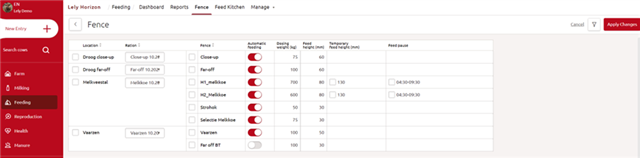
When you first open the updated fence page, you’ll see a few quick highlights pointing out what’s changed. These tips are there to help you get familiar with the new layout without needing to figure it all out yourself.
This update is designed to save you time and reduce the chance of manual errors, especially when managing multiple fences.
What do you think about this improvement?
-

gilbert09
-
Cancel
-
Vote Up
0
Vote Down
-
-
Sign in to reply
-
More
-
Cancel
-

Maud Frijhoff
in reply to gilbert09
-
Cancel
-
Vote Up
0
Vote Down
-
-
Sign in to reply
-
More
-
Cancel
Comment-

Maud Frijhoff
in reply to gilbert09
-
Cancel
-
Vote Up
0
Vote Down
-
-
Sign in to reply
-
More
-
Cancel
Children